
Skip to content
sponsor-license-holders
  • HOME
  • BLOG
Documentation Recrutifyhub

Knowledge Base Guide

Quick Startup Guide

Getting Started

  • Recruitifyhub: Introduction
  • Know The Work Flow
  • Setting
    • Profile Settings
    • Notification Settings
    • Currency Settings
    • Payment Credentials
    • Finance Settings
    • Tickets Setting
    • Company Settings
    • Attendance Settings
    • Leave Settings
    • Custom Fields
    • Roles and Permissions
    • Message Settings
    • Lead Settings

Admin

  • How to Register & Signup as Company Admin
  • Admin: One time settings

Employee

  • Employees
  • How to Add Designation & Department
  • How to Add Employee – How does an Employee Register?

Clients

  • Clients: Summary
  • Creating Client
  • Client Filters

Leads

  • What is Lead
  • Add Lead
  • Lead Follow-Up
  • Lead Forms
  • Lead KanBan Board
  • Lead Form – Custom Field
  • Lead Report
  • Lead Filters
  • Lead Settings

HR

  • Employees
  • Leaves
  • Shift Roster

Work

  • Contracts

Finance

  • Estimates
  • Proposal
  • Home
  • Docs
  • Employee
  • How to Add Employee – How does an Employee Register?

How to Add Employee – How does an Employee Register?

An employee is someone hired by a company to work for them. Registering an employee is done by the admin or someone authorized by the admin. This can be done in two ways:

  1. The admin or someone with permission can directly add the employee’s information to the company’s database.
  2. Alternatively, the employee can receive an invitation link and use it to join the company and provide their details for registration.
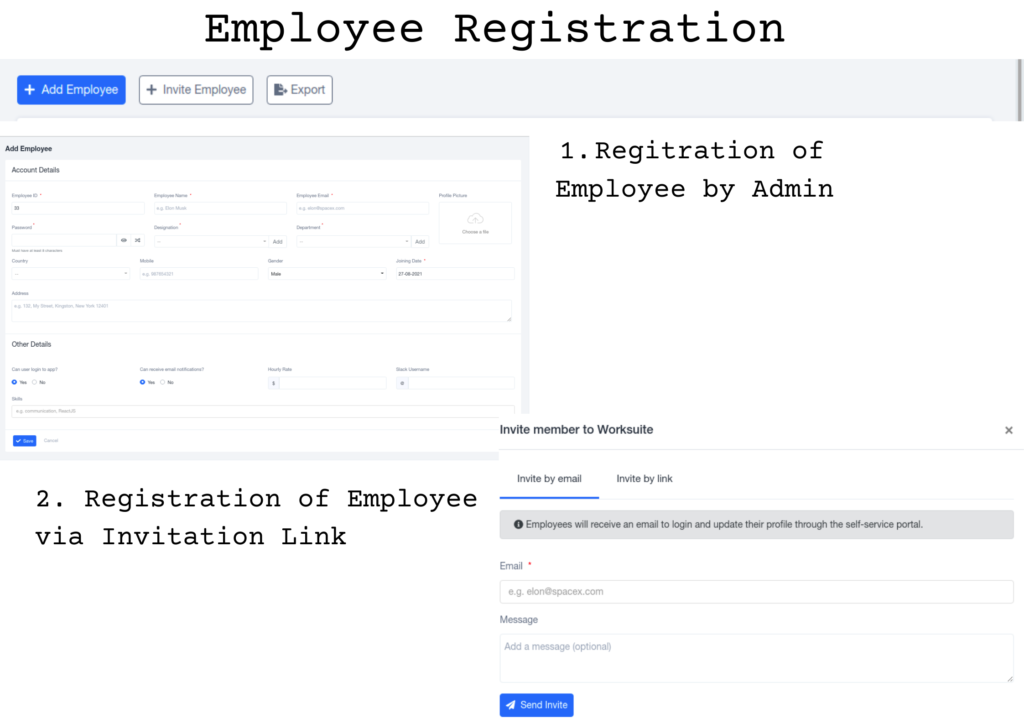
  1. Once the employee has been added, Recruitifyhub’s system automatically sends the login details to the employee’s email. This allows the employee to log in with ease
  2. If individuals need to change their credentials, such as passwords, they can do so by accessing their account settings, and navigating to profile settings.
What are your Feelings
Share This Article :
  • Facebook
  • Twitter
  • LinkedIn
  • Pinterest
Still stuck? How can we help?

How can we help?

Updated on September 8, 2023
How to Add Designation & Department

Powered by BetterDocs

© 2025 Documentation Recrutifyhub - Recruitifyhub

Scroll to top
  • HOME
  • BLOG